Webpack 2
Installation
npm install webpack --save-dev
Core concepts
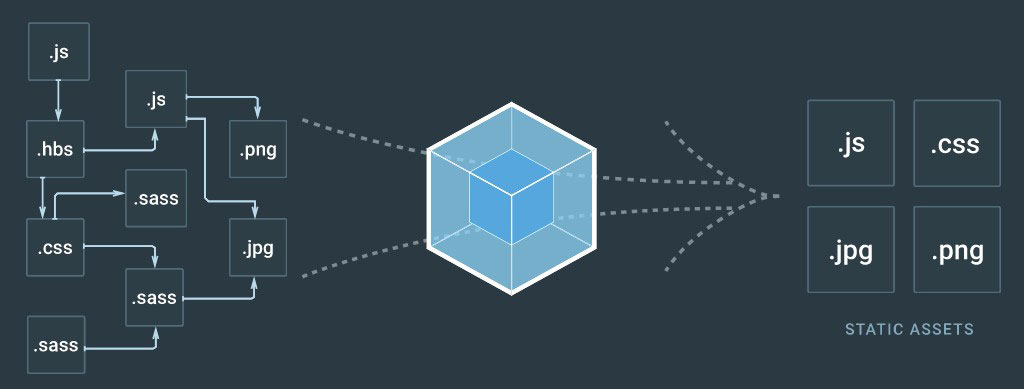
Dependency expressions
- ES6
importstatement - Commonjs
require()statement - AMD
defineorrequirestatement @importstatement inside stylesheets. (loader required)- Any urls inside stylesheet
url(...)or html file<img src='...' />(loader required) - Auto module injection (plugin required)
Resolving Paths
Naming keywords
Example
```js
//forest.js
import Tree from './tree';
import Water from './water';
let tree = new Tree();
let water = new Water();
tree.pour(water);
...
```
```js
//tree.js
import Leaf from './leaf';
import Root from './root';
import './colors.css';
class Tree {
....
}
export default Tree;
```
```js
//water.js
class Water { .... }
export default Water;
```
```js
//leaf.js
class Leaf { .... }
export default Leaf;
```
```js
//root.js
class Root { .... }
export default Root;
```
```css
/* colors.css */
.leaf { color: green; }
.root { color: brown; }
.water { color: transparent; }
```

forest.1234abcd.jscontains js dependencies, css & webpack bootstrap code
Code splitting
split the output bundle into multiple files (chunks)
Vendor code splitting
```js
//main.js
import $ from 'jquery'
import Promise from 'es6-promise' ...
```
```js
module.exports = {
entry: './main.js',
output: {
path: path.resolve( __dirname, 'build' ),
filename: '[name].[chunkhash:8].js'
}
} ...
```
```js
module.exports = {
entry: {
main: './main.js', //main.9897dsfd.js
lib: [ 'jquery', 'es6-promise' ] //lib.2144546.js
},
output: {
path: path.resolve( __dirname, 'build' ),
filename: '[name].[chunkhash:8].js'
}
...
}
```
*1.* Use multiple entries
Code Duplication
```js
const webpack = require('webpack');
module.exports = {
entry: {
main: './main.js', //main.9897dsfd.js
lib: [ 'jquery', 'es6-promise' ] //lib.2144546.js
},
output: {
path: path.resolve( __dirname, 'build' ),
filename: '[name].[chunkhash:8].js'
},
plugins: [
new webpack.optimize.CommonsChunkPlugin({
name: 'lib' //common bundle's name.
})
]
}
...
```
*2.* Add webpack's "CommonsChunkPlugin"
Uncertain hash
```js
const webpack = require('webpack');
module.exports = {
entry: {
main: './main.js', //main.9897dsfd.js
lib: [ 'jquery', 'es6-promise' ] //lib.2144546.js
},
output: {
path: path.resolve( __dirname, 'build' ),
filename: '[name].[chunkhash:8].js'
},
plugins: [
new webpack.optimize.CommonsChunkPlugin({
names: [ 'lib', 'manifest' ] // libs + extracted manifest
})
]
}
...
```
*3.* Extract manifest (webpack's runtime code)
Build files
```bash
1. manifest.1sd1sd13.js
2. lib.9sd8sd9t.js
3. main.2sd5sds4.js
```
CSS splitting
CSS inside a js module,
doesn't load asyc & parallel
causes Flash of unstyled content - FOUC
Extract CSS bundle from JS module
CSS splitting
ExtractTextWebpackPlugin
CSS splitting
Build files
```bash
1. manifest.1sd1sd13.js
2. lib.9sd8sd9t.js
3. main.2sd5sds4.js
4. main.568s4878.css #Extracted css bundle
```
On demand code splitting
Create dynamic split points in application code
```js
if(window.location.indexOf('admin') > 0)
import('./adminModuleYouLikeToSplit').then( (module) => {
//module available here
})
```
```js
require.ensure([], () => {
let module = require('./someModuleYouLikeToSplit'),
anotherModule = require('./anotherModuleYouLikeToAdd');
//modules available here
})
```
On demand code splitting
Build files
```bash
1. manifest.1sd1sd13.js
2. lib.9sd8sd9t.js
3. main.2sd5sds4.js
4. main.568s4878.js #new chunk, webpack auto fetches it
```
Webpack dev server
- Simple express server
- Serves webpack assets from memory
- Reloads the browser on change
- Supports live reload & HMR
```bash
$ npm install webpack-dev-server --save-dev
```
```js
devServer: {
contentBase: path.resolve(__dirname, 'build'),
host: 'localhost',
port: '8080',
proxy: 'http://localhost:8000'
}
```
```bash
$ webpack-dev-server #through package.json's scripts
```
Dynamic file reference
Dynamic
([name].[hash:8].js)
- main.df54s6df.js
- main.5441324s.js
- main.fbgfgh54.js
Static
([name].build.js)
- main.build.js
- main.build.js
- main.build.js
Change the js reference in html on each build?
Not a good idea!
Dynamic file reference
Single page application with one html entry file?
Use "HtmlWebpackPlugin" !
Dynamic file reference
Backend app generates html layout?
- Get asset manifest using "WebpackAssetsManifest" plugin
- Use the asset manifest file on your backend code
Dynamic file reference
Get asset manifest
```js
const WebpackAssetsManifest = require('webpack-assets-manifest');
module.exports = {
...
plugins: [
new WebpackAssetsManifest({
output: 'path/to/manifest.json'
})
]
...
}
```
A Sample manifest json file
```json
{
"lib.js": "/build/js/lib.27ab3f70.js",
"main.css": "/build/style/main.2c2cca10.css",
"main.js": "/build/js/main.2c2cca10.js",
"manifest.js": "/build/js/manifest.d41d8cd9.js"
}
```
Use asset manifest in your backend code
```php
// backend layout code of a blade engine
<link rel="stylesheet" href="{{ webpack_asset('main.css') }}" />
<script src="{{ webpack_asset('manifest.js') }}"></script>
<script src="{{ webpack_asset('lib.js') }}"></script>
<script src="{{ webpack_asset('main.js') }}"></script>
```
```php
function webpack_asset( $asset ) {
$json = json_decode( file_get_contents('path/to/manifest.json') );
return $json->{ $asset };
}
```
Few other features
- sourceMap
{ devtool: 'sourceMap' } - Dynamic require
require('template/' + name + '.js'); - Tree shaking
Few useful plugins
ProvidePlugin
OfflinePlugin
ImageminPlugin
Live project code
Questions?
Thank you all !
Have fun with webpack
https://moorthy-g.github.io/prez-webpack-2/